Show optional fields:
 ID Card Generator Online
Fill in your name, role, and organisation below — your card updates live as you type. When it looks right, hit Download or Print. That's all there is to it.
Images and card details are processed locally in your browser. The tool does not send your uploaded photo, logo, or card details to our server for processing.
Design a badge card or organisational pass using this free browser-based tool. This tool lets you add your name, photo, role, and organisation details. Download or print the finished card in PDF, PNG or JPG format. Note: Fields left blank will not appear on the printed card.
Disclaimer:
This ID Card Maker is for educational, organisational, and personal use only.
Cards created using this tool are design outputs only and must be used responsibly and lawfully.
Not affiliated: This is an independent website, not associated with any government body.
This is a free badge card maker that works entirely in your browser — no app to install, no account needed, nothing to pay. It can be used to create printable ID cards for schools, workplaces, events and other organisations.
The steps above cover the basics. A couple of things that aren't obvious at first: the ID Number field is optional — leave it blank and it disappears from the card rather than showing an empty gap. The same applies to any other field you don't fill in.
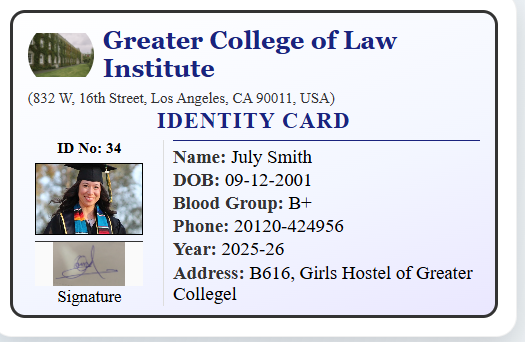
Digital badge cards offer some advantages over traditionally printed cards, particularly around updating and distributing them. A few benefits worth noting:
Create a card directly in your browser — no graphic design software or designer needed.
If a person's address, phone number, designation or year changes, the card can be edited and regenerated without reprinting delays.
The generator keeps the selected fields, photo and text arranged the same way every time, so a full batch of cards for a workplace, school or event keeps a uniform look without manual formatting.
Download as PDF, PNG or JPG depending on whether you're printing a physical card or sharing it digitally — and reprint or resend later without redesigning from scratch.
A well-designed badge card includes key details that help identify the cardholder at a glance. Depending on the use case, the following fields are commonly included:
Including these details helps the card clearly identify the cardholder.
A clean, well-structured badge card is easier to read. Keep these points in mind:
These choices mainly affect how quickly someone can read the card at a glance.
This tool includes more than 20 card sizes in the size dropdown, including landscape and portrait formats. Here are the ones people use most:
| Size | Dimensions | Best For |
|---|---|---|
| CR80 | 85.6 × 54 mm | Common ID-card size for employee, student and access badges — same size as a credit card. Default in this tool. |
| CR79 | 84 × 52 mm | Slightly smaller card format. |
| CR90 | 90 × 59 mm | Slightly larger card format. |
| ISO ID-1 | 85.6 × 54 mm | International identification standard — same physical size as CR80. |
| ISO ID-2 | 105 × 74 mm | Larger identification format. |
| ISO ID-3 | 125 × 88 mm | Larger identification format. |
| Business (US/EU/Japan) | 88.9 × 50.8 mm / 85 × 55 mm / 91 × 55 mm | Business-card-style ID, matching regional business card standards. |
Portrait versions of the supported card formats are also available in the dropdown, including vertical layouts useful for lanyard badges and student IDs. Choosing the correct size ensures compatibility with printers and card holders. The generated PDF uses the selected physical dimensions — when printing, choose 100% / Actual Size rather than Fit to Page to preserve them, since some printers rescale by default.
I built this after noticing that creating a printable ID card in a general design application makes it easy to lose track of the correct physical card size — the layout looks fine on screen but doesn't match what a card printer or PVC card stock actually expects. I made CR80 the default because it's a familiar ID-card size — the same dimensions as a standard credit card — and gives most people a recognisable starting point for employee and student cards.
Photo placement and blank-field handling were both things I paid close attention to while building this: uploaded photos are automatically fitted into the photo box, with the image cropped to fill the selected area rather than stretched or letterboxed, and a field left empty is removed from the layout rather than leaving a visible gap — I checked this across several combinations of filled and blank fields to make sure the layout holds up. PDF, PNG, and JPG output were each checked against how they actually print, since a file that looks right on screen can still come out at the wrong size if the export doesn't preserve dimensions properly — the PDF download uses the selected physical width and height for that reason.
Processing happens locally in your browser rather than on a server because there's no reason a badge card with someone's name and photo needs to leave their device to be generated. The trade-off is that very large photo files can slow down rendering on older phones — if that happens, compressing the photo first with our image compressor usually fixes it.
— Pradeep Khillare
A few checks before sending a batch to print — cheaper to catch a mistake on one card than after fifty are printed:
Building a full badge system rather than a single card? These other tools on this site are free to use alongside the generator above:
This tool was built to help students, employees and organisations put together a printable badge card without needing a graphic design background.
It runs directly in your browser, and processing your photo and details happens locally rather than on a server.